● Agentic · documents
Documents posted into the ledger.Classified, extracted, and checked before they post.
eManage Document AI classifies inbound PDFs and photos, selects the right OCR model, cross-checks GSTIN, amounts, and PO lines, then posts GRNs and vouchers or flags anomalies before a clerk touches the packet.
Types
GST invoice
PO and GRN too
Action
Post or hold
Anomaly before voucher
Formats
PDF · image
Phone or scanner
Loop
Closed
ERP master write-back
eManage AI · Document AI
PDF · PNG · JPG · GSTIN CHECK
The problem
The packet arrives. The clerk retypes it.
Every GRN, invoice, and e-way document is a second entry of a fact that already existed on paper. Errors show up at GST, not at the gate.
Latency
Same-day inward, next-day books
Invoices pile until accounts has a quiet afternoon.
Mismatch
PO lines vs what was billed
Quantity, HSN, and tax splits are checked by eye.
KYC
Onboarding is a folder
PAN and GST certificates still get keyed into party masters.
On the device
Approve the extract
Invoice fields, GSTIN, and PO lines reviewed on a 16 Pro Max — hold or post without a weak crop of the desktop UI.
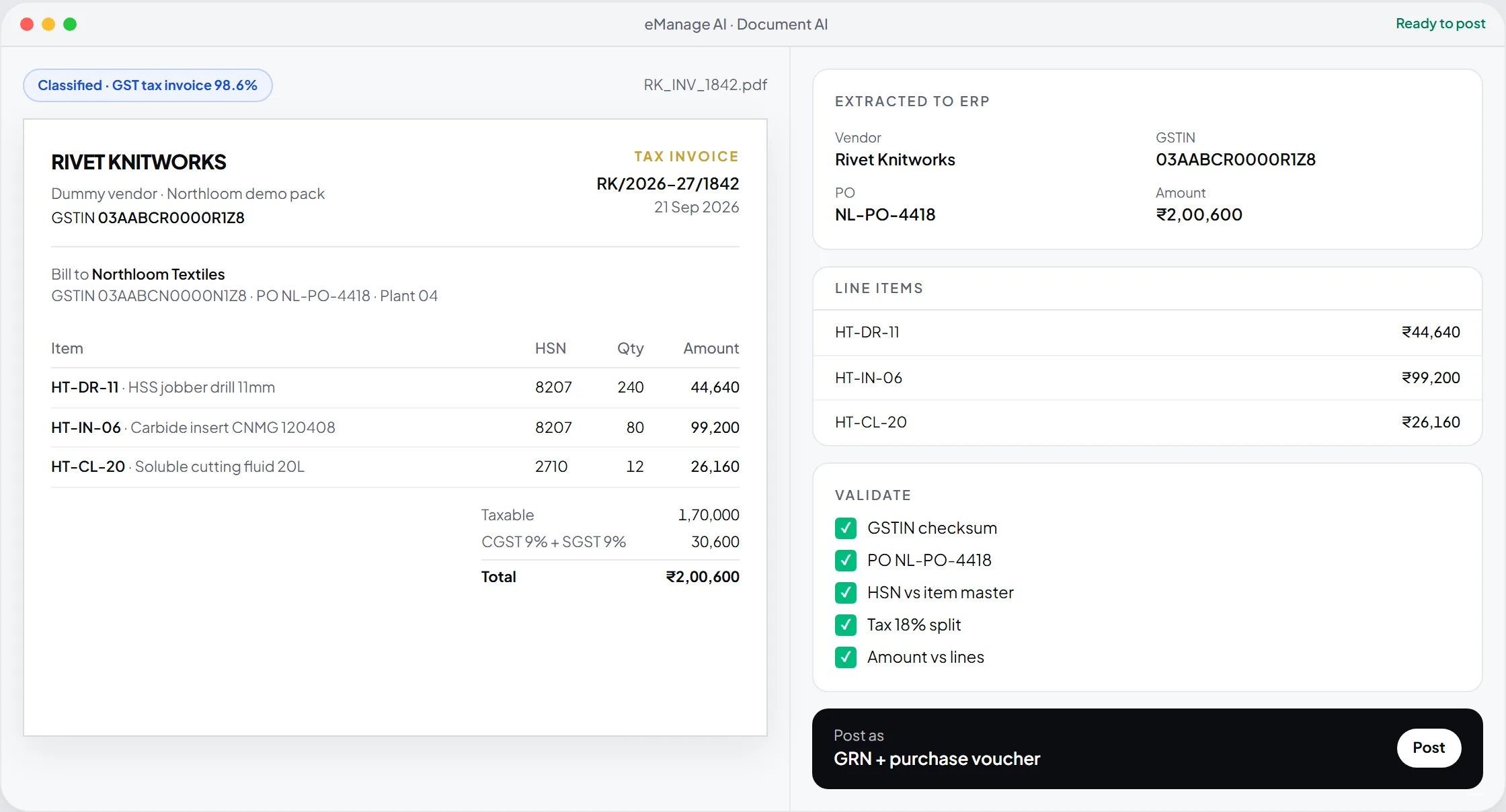
Document AI
Northloom Textiles
Tax invoice
Rivet Knitworks
Bill to Northloom Textiles
21 Sep 2026
Plant 04
₹ 2,00,600
Payable · matches PO + GST split
- ✓
Vendor
Rivet Knitworks
- ✓
GSTIN
03AABCR0000R1Z8
- ✓
Invoice
RK/2026-27/1842
- ✓
PO match
NL-PO-4418 · 3 / 3 lines
- ✓
Taxable
₹ 1,70,000
- ✓
GST 18%
₹ 30,600
How it works
Four moves.
One write-back.
01
Classify
The agent decides invoice, PO, bank statement, KYC, or unknown — and refuses to force a wrong template.
02
Extract
It selects the trained model for that class. Fields come out structured, not as a blob of text.
03
Validate
GSTIN checksums, PO balances, and amount totals are cross-checked before anyone files.
04
Post
Clean packets become ERP transactions. Exceptions land in a hold queue with the original image.
Pipeline
Classify → extract → post
01
Classify
Invoice, PO, KYC, bank — or unknown hold.
02
Extract
Model chosen per class, fields structured.
03
Validate
GSTIN, totals, PO balance.
04
Post
Voucher and image — or the hold queue.
Write-back is the product
Extraction that dies in a CSV is a demo. eManage posts to party masters, GRN, purchase voucher, and the document archive attached to the transaction.
- Hold on GSTIN, HSN, or amount mismatch — never silent overwrite
- Original image stored against the voucher for audit
- Works from a phone photo at the gate or a desktop scan in accounts
Questions plants actually ask
Invoices, purchase orders, e-way / transporter docs, bank statements, and KYC packs (PAN, GST certificate). Unknown types go to a review queue instead of a wrong template.
The agent posts nothing. It flags quantity, rate, tax, or HSN deltas and keeps the image on the hold queue for accounts.
Yes. OCR models can sit on plant or HO edge hardware so trade documents do not leave your network.
It removes retyping. Clerks work exceptions and approvals — the same controls they already have in eManage.
Next